


Sunbit
3.9617.00 Reviews
App Specs
- Version
- 2.6.37
- Updated On
- License
- Free
- Downloads
- 500,000+
- Developer
- Sunbit
- Categories
- Finance
- Platform
- Android
Screenshots
 Analysis by AppCompare
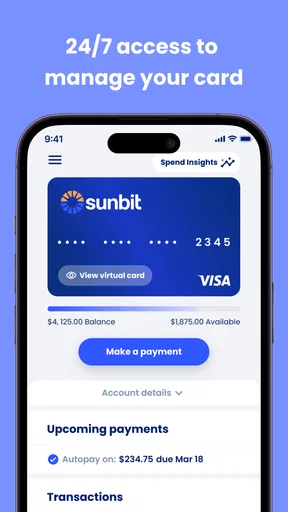
Managing a credit account is rarely exciting, but it can become stressful when payment details, balances, and plans are scattered across messages, paper statements, and a browser. Sunbit is a free finance app from Sunbit designed to put its card and payment-plan information in one mobile place. I found its appeal less in novelty and more in reducing the number of small checks I need to make when I want to understand what I owe.
The app is aimed at people who already use Sunbit rather than anyone looking for a general budgeting tool. That distinction matters. It is not a replacement for a complete banking app, a spending tracker, or a broad financial-planning service. Its job is narrower: help you manage your Sunbit Card and payment plans while you are away from a desktop. When that matches your situation, the focused design makes sense. When it does not, there is little reason to keep it installed.
What the first week feels like
During the first week, the strongest benefit is convenience. Instead of treating a payment plan as something I only revisit when a reminder arrives, I can open the app and check its current details when it suits me. That is useful after making a purchase, before planning other bills, or when I simply want to confirm that I am looking at the right account.
I particularly like the idea of using it as a quick financial checkpoint. A dedicated card app can be easier to interpret than a full bank application where the same account sits beside checking, savings, transfers, and unrelated transactions. Sunbit keeps the attention on the Sunbit relationship, which can make a short balance check feel less like an administrative task.
The practical question for a new user is whether the app supports the account activity they actually need to monitor. If your main concern is Sunbit Card management or an active payment plan, the purpose is clear. If you are expecting a complete view of every credit card, loan, and household bill, the first impression may be underwhelming because this is a specialized companion, not a universal money dashboard.
Sunbit is free to download, carries an Everyone age rating, and supports devices running Android 8.0 or later. Its current version is 2.6.37, which is useful context for anyone deciding whether an older phone can handle it. The app has been available since May 23, 2021, so it is not a brand-new experiment, although the experience still depends on how well its current release fits your device and account.
One habit I recommend from the start is to use the app at a predictable moment rather than opening it only when something feels wrong. For example, checking a plan after reviewing the rest of the week’s bills can help you place the Sunbit obligation in context. The app cannot create discipline by itself, but a focused account view can make a recurring check easier to remember.
Worth Reading Before You Choose

EA SPORTS FC Mobile 26 Is a Bigger Football Game, but It Takes Time

Flipboard Shows What News Apps Must Do Beyond the Feed

Switching to Android Auto Means Rethinking Your Driving Routine

Google Calendar Makes a Crowded Week Easier to Manage

Ludo King Makes the Most of the Minutes Between Plans

Baby Panda World Brings Quick Play to Modern Phones, but Its Game Library Feels Busy
Where it helps in an everyday situation
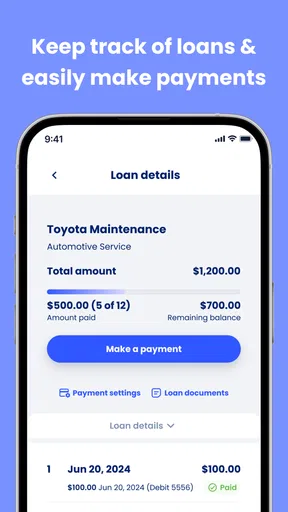
Imagine that I have arranged a purchase through Sunbit and later need to decide whether I can afford another expense before payday. I do not want to search through old paperwork or rely on memory. Opening the app gives me a direct place to review the relevant Sunbit account information and payment plan. That small step is valuable because it turns an uncertain decision into one based on the account I am actually managing.
The same workflow helps when a household has several people discussing a purchase. Rather than passing around a statement or trying to reconstruct the arrangement from memory, the account holder can check the plan directly. I would still treat the app as a reference point, not as permission to stretch a budget. Easy access to payment information is helpful, but it should support a decision that was already affordable.
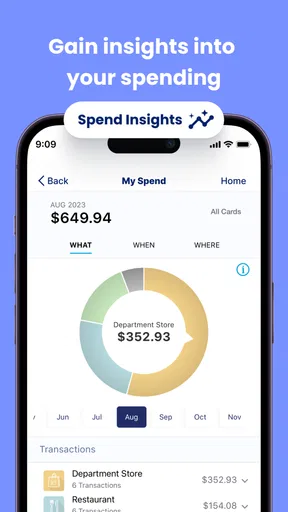
Another less obvious use is separating “what I owe through Sunbit” from “what I spend overall.” Those are different questions. The app can serve the first question, while a bank app or spreadsheet may be better for the second. Keeping those roles separate prevents the common mistake of assuming that a clean payment-plan view is the same thing as a complete financial picture.
What remains useful after the novelty fades
Most finance apps feel useful during setup and then become background utilities. Sunbit has a better chance of lasting because its value is tied to a continuing account relationship. As long as I have a Sunbit Card or an active plan to manage, there is a practical reason to return. The usefulness is recurring rather than entertainment-based, and that is a good foundation for long-term retention.
Still, recurring value depends on the frequency of the decisions involved. If I rarely need to inspect the account, the app may become something I open only around payment dates. That is not necessarily a weakness; a finance tool does not need daily use to be worthwhile. In fact, forcing myself to check a payment account constantly would be unnecessary. The better test is whether it saves time and uncertainty whenever a relevant question comes up.
Its average rating is 3.9 from around 1.4 thousand ratings, while the app has received around 615 written reviews and passed 500 thousand installs. I read those figures as evidence of a meaningful user base with mixed experiences rather than as a reason to assume perfection. For me, the important point is that the app has enough adoption to be a familiar tool for Sunbit customers, but the rating also argues for realistic expectations.
The lasting benefit is strongest for users who want one dedicated place to revisit their Sunbit arrangements. I would not keep it installed merely because it is free. I would keep it if I had an active reason to check the card or a payment plan, especially if doing so was simpler than using the usual alternatives available through a browser or a general financial app.
Maintenance without turning finance into a chore
The maintenance burden is relatively easy to understand: keep the app available, sign in when needed, and review the account information before making decisions connected to the plan. That is less work than maintaining a detailed manual ledger, but it still requires attention. No app can replace reading the figures carefully or remembering that the payment plan is one part of a wider budget.
I would also avoid treating the app as a passive notification box. A reminder can prompt action, but the more useful habit is to open the account when I am already reviewing upcoming expenses. This makes the app part of a routine instead of an emergency tool. It is a subtle difference, but it affects whether the app remains useful after the initial download.
One maintenance advantage of a focused app is that there are fewer unrelated screens competing for attention. A general bank app may show a larger financial picture, but that breadth can create extra taps when I only want to inspect Sunbit. The trade-off is that I may need to move between apps to understand my total obligations. I prefer that division when I am checking one specific plan, but I would choose a broader financial tool for monthly household planning.
Users should also consider device age before committing to a routine. Support for Android 8.0 or later covers many older phones, but people using very old hardware should still expect the experience to depend on the current operating environment. Keeping any finance app updated is sensible, particularly when it handles account access, even though an update alone should never be treated as a substitute for cautious account habits.
For someone who changes phones often, the important maintenance question is not how many times the app is opened but whether the account can be accessed comfortably after a device change. I would install it only from the official app marketplace, use a secure device lock, and avoid checking sensitive financial information on a shared phone. These are simple precautions, but they matter more than decorative features in a payment-management app.
Where fatigue can set in
The main source of fatigue is narrow scope. Sunbit does one specific job, and that can feel efficient at first. Later, I may find myself switching to another app to see income, unrelated cards, recurring subscriptions, and available cash. If I expected Sunbit to become my central financial command center, that repeated switching would feel like friction.
A second source of fatigue is the emotional weight of payment plans. An app can make account information easier to reach, but it cannot make a commitment disappear. If I open it only when worried about a payment, the app may become associated with stress. A scheduled, calm review is a better approach than repeatedly checking the account without a clear purpose.
There is also a trade-off between convenience and overconfidence. A clean mobile view can make an account feel manageable, but the ease of access should not encourage impulse purchases or the assumption that an installment arrangement is automatically affordable. I would use the app to understand an existing obligation, not as a reason to justify a new one.
People who want detailed spending categories, investment monitoring, bill aggregation, or long-range budgeting should probably choose a different primary tool. A full banking app is better for seeing cash flow, while a budgeting service or spreadsheet is better for comparing income with all obligations. Sunbit makes more sense alongside those tools than instead of them.
Another possible frustration is simply having a separate account app at all. Every additional finance app creates another place to remember, update, and protect. If your Sunbit activity is rare and the browser experience already fits your routine, the mobile installation may not earn permanent space. The convenience becomes worthwhile when it removes enough effort from regular account checks to justify that extra app on the phone.
Who should keep it installed
I would recommend Sunbit to an existing Sunbit customer who wants quick mobile access to card or payment-plan information. It is especially suitable for someone who makes financial decisions away from a computer and prefers a focused account view over navigating a larger banking website. The free price removes an obvious barrier, so the decision mostly comes down to whether the account is active enough to need regular access.
I would be more cautious for a person who is comparing several finance apps and wants one place to manage everything. Sunbit is not the right choice as a universal money manager. It also may not be useful for someone with no Sunbit Card or payment plan, because its purpose is tied closely to that relationship rather than to general financial education.
For families, I would clarify who owns the account and who is responsible for the payment before relying on the app as a shared reference. A mobile account view can improve communication, but it does not replace an agreed household budget. Used carefully, it can help the responsible account holder answer practical questions without turning every conversation into a search through documents.
My long-term verdict
After the first-week appeal wears off, Sunbit earns its place through repeat usefulness rather than feature discovery. The app is most convincing when I need to check a Sunbit Card or payment plan quickly and want that information separated from the noise of a general banking app. Its focused purpose is both its strength and its boundary.
My lasting recommendation is therefore conditional but positive: keep it if you actively use Sunbit and it makes account reviews easier; skip it if you need broad budgeting, account aggregation, or detailed spending analysis. The app is not trying to solve every financial problem, and I think it is better judged for the task it actually serves.
Sunbit, developed by Sunbit, has enough practical value to become a quiet part of a payment routine. I would not call it an essential finance app for everyone, but for the right account holder it can reduce uncertainty at exactly the moments when a clear, direct view matters. Its real long-term strength is dependable access to one specific financial relationship, not a promise to replace your entire money-management system.
Pros
- Quick financing decisions can help cover urgent purchases.
- The app provides clear payment schedules before you commit.
- Useful for budgeting larger expenses into manageable installments.
- Application is designed for a simple
- mobile-first user experience.
- Available financing may support purchases from participating merchants.
Cons
- Sunbit financing is only available through participating providers.
- Approval does not guarantee the lowest interest rate available.
- Late or missed payments may lead to fees or credit consequences.
- Loan terms and limits can vary based on your personal credit profile.
- Some users may prefer paying upfront instead of taking on installment debt.
FAQs for Sunbit
What is Sunbit, and how does it work?
Sunbit is a point-of-sale financing platform that allows eligible customers to apply for payment plans when purchasing products or services from participating merchants. Depending on the merchant and your approval, you may be able to split a purchase into scheduled installments rather than paying the full amount immediately. The application process generally uses personal and financial information to provide an eligibility decision.
Does using Sunbit affect my credit score?
Sunbit may use different types of credit checks depending on the application stage, product, and merchant. Checking whether you qualify may not always have the same effect as formally accepting a financing offer, but users should review the disclosures shown during the application process. Before agreeing, carefully check whether the plan involves a hard inquiry, how payments are reported, and the consequences of late or missed payments.
What fees and interest charges does Sunbit have?
The total cost of using Sunbit depends on the purchase amount, repayment term, merchant, and the offer you receive. Some plans may advertise no interest, while others can include an annual percentage rate or other applicable costs. Do not rely only on the installment amount; review the complete agreement, including the total repayment amount, due dates, late-payment terms, and any optional services.
Who can use Sunbit, and what information is required to apply?
Sunbit availability depends on factors such as the participating merchant, your location, age, identity, and financial profile. During the application, you may be asked for information including your name, address, date of birth, contact details, and income or payment information. Approval is not guaranteed, and requirements can vary. Only provide information through the official Sunbit app, website, or an authorized merchant checkout.
What happens if I miss a Sunbit payment or need help with my account?
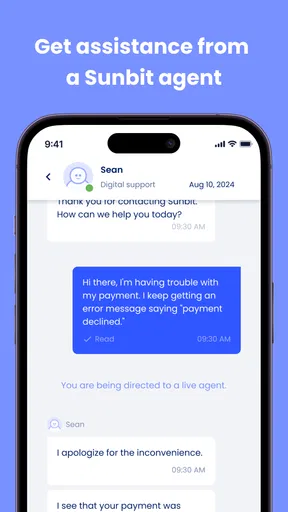
Missing a scheduled payment can result in additional charges, account restrictions, collection activity, or possible effects on your credit history, depending on the terms of your agreement and applicable reporting practices. If you expect difficulty paying, contact Sunbit as soon as possible rather than waiting until the due date has passed. The app or account portal can typically be used to review balances, manage payments, and access customer support.


